
Ransomware and Data Breaches: The Developer's Security Playbook for 2026
Breaches make headlines; misconfigurations make breaches possible. Here is what devs control in the blast radius.
~12 min read
Ransomware groups do not start by fuzzing your validation middleware. They start with a Snowflake password that never had MFA, a GitHub PAT in a forked workflow log, or a staging Postgres dump that someone left world-readable on S3.
The headline says "sophisticated cyberattack." The postmortem says credential without MFA and backup bucket in the same AWS account.
I write this as a developer who ships MERN and Next.js apps, not as a SOC analyst. Security teams own the bridge call. You own the IAM roles, the env vars, the CI YAML, and whether logs exist when someone asks "what did the attacker touch?"
What is modern ransomware (and why backups stopped being enough)
Classic ransomware: encrypt files, demand Bitcoin, restore from backup, go home.
Double extortion (dominant since ~2020): exfiltrate data first, then encrypt. Even perfect restores leave you with leak extortion, regulatory notification, and customers asking why their PII was in your staging DB.
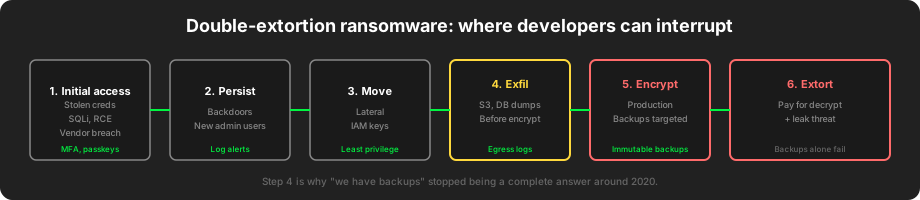
Step 4 in that diagram is the shift most dev teams underestimate. Attackers price your ransom against data sensitivity, not just downtime.
| Phase | Attacker goal | Developer lever |
|---|---|---|
| Initial access | Foot in door | MFA, passkeys, no shared admin |
| Persistence | Stay after password rotate | Log new users, API keys, cron |
| Lateral movement | Reach prod data | IAM boundaries, network segmentation |
| Exfiltration | Copy before encrypt | Egress alerts, DB audit logs |
| Encryption | Business pressure | Immutable off-site backups |
| Extortion | Payment | Legal/comms (not your solo call) |
What is a data breach for developers?
A breach is unauthorized access to confidential data (PII, secrets, source, financials). Ransomware is one outcome. Others:
- Silent read-only access for months (common in SaaS credential stuffing)
- Public S3 bucket indexed by search engines
- SQL injection in a forgotten admin panel
- Third-party SaaS compromise via OAuth token
You do not need encryption to have a breach. Read access counts.
The three controls you actually own

If one corner of that triangle is missing, the other two work harder until they fail.
Identity: stop being the weak MFA link
Snowflake customer incidents (2024) were not a Snowflake zero-day. Attackers used stolen customer credentials where MFA was not enforced, then used SESSION persistence to harvest data from multiple tenants. Same pattern hit other cloud warehouses.
Developer playbook:
- No long-lived cloud keys in git. Ever. Rotate on every leak suspicion.
- SSO + MFA on GitHub, cloud console, database admin. Prefer passkeys for human access.
- Separate roles:
dev-read,staging-deploy,prod-deploy. Prod deploy role cannot read raw user tables if possible. - CI uses OIDC, not static
AWS_ACCESS_KEY_IDin repo secrets.
// Bad: static keys in GitHub Secrets, copied to local .env
// Good: short-lived credentials via OIDC in Actions, or instance role on the host

// Example: scope a deploy script to one service (pseudo-IAM policy shape)
{
  "Effect": "Allow",
  "Action": ["ecs:UpdateService"],
  "Resource": "arn:aws:ecs:ap-south-1:123456789012:service/prod/api",
  "Condition": {
    "StringEquals": { "aws:PrincipalTag/environment": "prod" }
  }
}
GitHub PAT leaks still appear in breach reports. Use fine-grained tokens, minimum repo scope, expiry dates, and never log them in CI (see tj-actions/changed-files exposure in 2025).
Backups: untested backups are wishes
Change Healthcare (2024) disruption showed what happens when identity and segmentation fail in a connected enterprise: weeks of downstream outage, manual workarounds, federal scrutiny. You may not run a clearinghouse, but the pattern applies: one overconnected environment becomes everyone's problem.
For product teams:
- Automated backups on a schedule you can state from memory
- Restore drill quarterly (actually mount the backup, run a query)
- Immutable storage (S3 Object Lock, WORM, separate cloud account)
- Backups not reachable from the same IAM role that runs production
# Restore drill checklist (run in staging, document minutes-to-recovery)
# 1. Pick random backup ID from last 7 days
# 2. Restore to isolated VPC / local docker
# 3. Run: SELECT COUNT(*) FROM users; plus one app smoke test
# 4. Record: RTO achieved, blockers, who owns fix
If attackers encrypt prod and your backup bucket uses the same admin role, you lose twice.
Logging: centralize before the incident
When someone asks "did they download the user table?", nginx access logs on one laptop are not an answer.
Minimum viable logging for a web app team:
- Authentication events (success, failure, password reset, new device)
- Admin actions (role change, export, bulk delete)
- Deploy and config changes (who promoted what)
- Database slow query / audit for sensitive tables (where supported)
Ship logs to one searchable place (CloudWatch, Loki, Datadog, whatever). Set retention you can afford (30–90 days beats 3 days).
// Express middleware: log security-relevant admin routes with actor + request id
app.use((req, res, next) => {
  req.requestId = crypto.randomUUID();
  res.on('finish', () => {
    if (req.path.startsWith('/admin')) {
      logger.info({
        requestId: req.requestId,
        actor: req.user?.id,
        method: req.method,
        path: req.path,
        status: res.statusCode,
        ip: req.ip,
      });
    }
  });
  next();
});
Alert on boring things that precede breaches:
- Spike in 401/403 followed by 200 from new IP ranges
- New IAM user or access key created at 3 a.m.
- Large S3 GetObject egress from prod role to unknown prefix
Recent breach patterns (and what devs should change)
These are simplified for action items. Read official postmortems and SEC filings for full detail.
Pattern 1: Third-party SaaS and OAuth integrations
A vendor gets compromised. Your data leaves through a legitimate API token you issued years ago.
Fix: Inventory OAuth grants. Rotate client secrets. Scope tokens to minimum endpoints. Delete integrations nobody names in standup.
Pattern 2: Overprivileged CI token → org-wide repo access
One workflow secret or PAT with repo + workflow scope lets attackers push to every repository in the org, including pipeline tampering.
Fix: OIDC per environment. GitHub Environments with required reviewers on prod. Pin Actions to commit SHA. Audit pull_request_target usage.
Pattern 3: Forgotten staging with production data
Staging DB is a copy of prod "for realistic testing." Staging auth is test/test. Staging is on the public internet because someone needed a demo link.
Fix: Synthetic data in non-prod. Separate auth. IP allowlist or VPN. Never copy prod PII without classification and expiry.
Pattern 4: SQL injection in legacy admin
The React app is modern. The PHP admin panel from 2016 still runs on /admin-old. It has no ORM, no rate limit, shared DB credentials.
Fix: Kill or firewall legacy. Parameterized queries only. Read-only DB user for reporting tools.
Pattern 5: MOVEit-style third-party managed file transfer
CVE-2023-34362 in Progress MOVEit Transfer was exploited at mass scale in 2023. Many affected orgs did not run MOVEit themselves; a vendor or HR platform did.
Fix: Vendor security questionnaire is not paperwork. Ask: Do you expose managed file transfer? MFA enforced? Patch SLA? Contractually require breach notification.
Pattern 6: Ransomware via initial access broker
Groups like LockBit, BlackCat/ALPHV, and affiliates buy access from others who phished creds or exploited edge CVEs. Your app might be stage 5, not stage 1.
Fix: Pair this post with zero-day patching discipline. Initial access is often edge or identity, not your Node version.
During an incident: developer checklist
Do not hero-push. Do not delete logs to "reduce noise."
- Confirm with security lead / on-call. Is this active encryption or recon?
- Preserve logs: extend retention, snapshot log buckets, export auth events
- Isolate: disable compromised service account keys, block suspicious IPs at WAF (temporary)
- Rotate secrets in order: CI, cloud, DB, API keys, OAuth client secrets
- Stop deploys until you know attacker did not commit a backdoor
- Communicate: one writer, factual updates, no speculating in public Slack
- Evidence: git refs, IAM CloudTrail, login timestamps for postmortem
# Emergency: revoke all active access keys for a compromised IAM user (AWS CLI)
aws iam list-access-keys --user-name COMPROMISED_USER
aws iam update-access-key --user-name COMPROMISED_USER --access-key-id AKIA... --status Inactive
aws iam delete-access-key --user-name COMPROMISED_USER --access-key-id AKIA...
If production is encrypting live: call incident commander, not only #dev-random.
Stack-specific notes for MERN / Next.js teams
This is the stack I work in most. Practical defaults:
Next.js / Vercel
- Environment variables per environment; no prod secrets in Preview unless Preview is gated
- Review Server Actions and API routes for auth on every handler (middleware alone is not enough)
- Enable Vercel deployment protection on non-public previews
Express / Node
helmet, rate limiting on auth routes, bcrypt/argon2 for passwords (or delete passwords via passkeys)- Do not expose MongoDB/Redis to
0.0.0.0
MongoDB
- Auth enabled, least-privilege DB users, no
0.0.0.0/0in Atlas network access "because VPN was hard"
Dependencies
- Compromised npm package = instant breach. Read supply chain defenses.
When I build Study Stream Black, optional cloud features (Supabase) stay off the critical path for local playback. That is a product choice and a blast-radius choice: fewer live credentials in a desktop app means fewer things to leak.
Rate limiting and abuse controls (cheap wins)
Ransomware affiliates buy access; others still walk in through credential stuffing on your login form.
import rateLimit from 'express-rate-limit';

const authLimiter = rateLimit({
  windowMs: 15 * 60 * 1000,
  max: 20,
  standardHeaders: true,
  legacyHeaders: false,
  message: { error: 'Too many attempts, try again later' },
});

app.post('/api/login', authLimiter, loginHandler);
Pair with account lockout or backoff after repeated failures, and notify users on new device login. These controls do not stop APTs; they stop automated spray that becomes your breach ticket.
Third-party OAuth: the inventory nobody maintains
Every "Sign in with Google" or HR SaaS integration is a persistent API key into your org.
Quarterly task (calendar it):
- List OAuth apps in Google Workspace / GitHub org / Slack apps installed
- Remove integrations with no named owner
- Rotate client secrets for anything still used
- Confirm redirect URIs match production URLs only (no stale
localhostprod keys)
The MOVEit pattern repeats because vendors hold your data on systems you forgot were in scope.
Trade-offs worth arguing about in retro
Security vs velocity: Emergency patches beat feature flags only if you have flags and canaries. Invest once.
Logging cost vs forensic blindness: 30 days of structured logs is cheaper than one day of outage guessing.
Staging realism vs PII law: Synthetic data generators are boring until legal asks who downloaded the leak.
Shared admin account: Saves five minutes, costs the company in incident hours. Ban it.
Detection queries worth adding before you need them
These are illustrative patterns. Adapt field names to your log stack.
Spike in failed auth followed by success (possible stuffing or spray):
status:401 OR status:403
| stats count by src_ip, user
| where count > 50
New cloud access key created:
eventName: CreateAccessKey
| filter userIdentity.type = "IAMUser"
Large outbound transfer from prod role (exfil hint):
eventName: GetObject
| filter bytes > 1000000000
| stats sum(bytes) by userIdentity.arn
Wire one alert this week. Not ten. One that pages someone who can revoke a key.
Notification and legal: what devs should not solo
When exfiltration is confirmed, customer notification, regulator timelines (GDPR 72-hour window where applicable), and law enforcement are not tasks for the engineer who noticed the S3 egress spike.
Your job is evidence preservation and technical containment. Document timelines in UTC. Hand off to leadership with:
- First suspicious log timestamp
- Affected systems and data classes (PII yes/no)
- Actions taken (keys rotated, services isolated)
- What is not yet known (scope still scanning)
Ransomware payment: not your call
Developers sometimes get asked "can we decrypt if we pay?" or "can we trace the wallet?"
That is legal, finance, and executive territory. Your input is technical: do backups restore cleanly, is there a backdoor in git, what data classes were in the exfil path. Stay in that lane.
Pre-incident tabletop (90 minutes, pizza optional)
Run this once per quarter with eng + one person who owns prod access:
- Scenario: "GitHub Actions secret appeared in a public fork PR log." Walk through rotate → audit repos → disable workflow.
- Scenario: "Staging Mongo has prod copy; someone posted connection string in Discord." Walk through isolate → credential rotate → notification draft.
- Scenario: "VPN vendor KEV CVE dropped this morning." Walk through who checks version, who approves emergency maintenance.
You will find gaps. That is the point.
FAQ
Are developers responsible for ransomware prevention?
You are responsible for what you ship and configure: IAM, secrets, CI, logging, backup restore paths, dependency choices. Legal, PR, and ransom negotiation sit elsewhere. Prevention is shared; misconfigurations often land on engineering first in postmortems.
How is ransomware different from a regular data breach?
Ransomware adds encryption for availability impact and often public leak threats. A breach can be read-only exfiltration with no ransom note. Both may require customer notification depending on jurisdiction.
What is the first thing to do if we suspect a breach?
Preserve logs, stop active bleeding (rotate compromised creds, isolate affected systems), and escalate to your incident process. Do not wipe machines before forensics unless encryption is spreading and you have explicit guidance.
Do backups protect against ransomware?
They protect availability if immutable and off-line from prod credentials. They do not protect against data leak extortion if attackers exfiltrated first. You need both backup discipline and exfil detection.
Should small teams without a security department care?
Yes. Automated attacks are not sized to your headcount. A three-person startup with a public S3 bucket and GitHub org admin PAT in CI is a high-value low-effort target.
Closing: make the postmortem boring
The goal is not to win a security award. The goal is that when something hits, you already know which Ivanti version you do not run, which backup you restored last Tuesday, and which GitHub App has org admin.
Read next: Zero-day attacks and CVE patching · Passkeys for developer accounts · npm supply chain
If this checklist finds one shared admin account or one untested backup, it paid for the read.
Written by Rohit Singh, software developer in Jaipur. All blog posts · GitHub