
AI Agents in 2026: What Production Teams Actually Ship
Vendor decks promise autonomous employees. Production teams ship narrow loops with budgets, approvals, and traces. Here is the 2026 map.
~18 min read
Your staging agent just called delete_user because the planner misread a ticket title. The demo looked brilliant on Tuesday.
That gap between agent demos and agent deployments is the real story of 2026. Models got better at reasoning. Production got stricter about side effects, spend, and audit trails. If you are evaluating agents for your team, ignore the keynote and look at what survived a quarter in prod.
I am Rohit Singh, a developer in Jaipur shipping desktop apps like Study Stream Black and client MERN work. I run small agents for PR triage and internal ops, not keynote demos. This map is what survived contact with real APIs, finance questions, and a security review that actually read the tool list.
What is an AI agent (in production terms)?
An AI agent is not a chatbot with extra confidence. It is a control loop:
- Read state (user message, ticket, metrics, files)
- Plan the next action
- Call a tool (API, SQL, shell, browser, MCP server)
- Append results to memory
- Repeat until a stop condition (task done, max steps, timeout, human approval)
Chat is one interface. Cron triggers, GitHub webhooks, and Slack slash commands are others. The loop is the product.
| Term | Production meaning |
|---|---|
| Tool | A function with a schema; side effects are explicit |
| Orchestration | Who decides the next step: fixed graph vs model loop |
| Memory | Session transcript, summaries, vector retrieval, files |
| Governance | Approvals, RBAC, budgets, logging |
Generic "do my job" agents fail because step 3 is unbounded. Teams that ship pick one workflow and hard-cap the loop.
The five-layer stack that actually ships
Every production agent I have seen decomposes into five layers. Skip one and you will feel it in incident review.
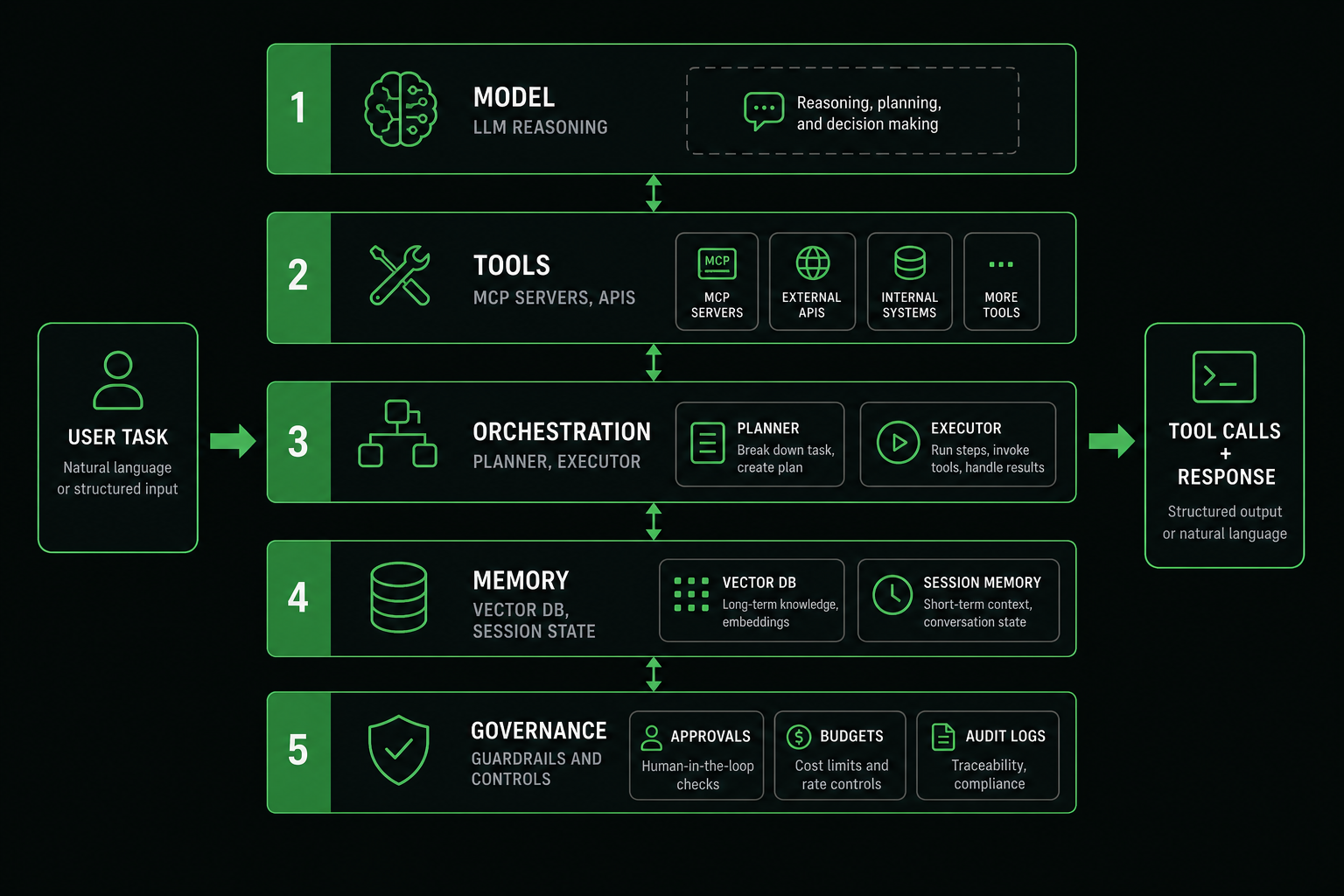
1. Model (reasoning and cost)
Pick the smallest model that passes your eval set. A support triage agent does not need the same model as a codegen agent. In 2026 most teams run tiered routing: cheap model for classification, expensive model only when the first pass is uncertain.
Rough order-of-magnitude for a 12-step agent run on a mid-tier API model: $0.02–$0.15 depending on context size. Multiply by daily runs before you promise finance a headcount replacement.
2. Tools (MCP and function APIs)
Tools are how agents touch reality. Model Context Protocol (MCP) standardizes discovery, schemas, and transport so you can swap hosts (Cursor, Claude Desktop, internal runners) without rewriting integrations.
Production rules for tools:
- Read before write — default tools to read-only; gate mutations behind approval
- Idempotent writes where possible (
create_issuewith client-generated idempotency key) - Narrow schemas — "search_logs(query, limit)" beats "run_arbitrary_sql"
- Least privilege tokens — scoped API keys, read replicas, row limits on SQL tools
3. Orchestration (graph vs loop)
Two dominant patterns in 2026:
| Pattern | How it works | Ships when |
|---|---|---|
| Orchestrated graph | Explicit steps: ingest → classify → retrieve → draft → human publish | SLAs, compliance, predictable cost |
| Autonomous loop | Model picks tools until stop | R&D, internal tools, human reviews every write |
Hermes-style vs OpenClaw-style stacks are really this choice dressed in framework names. Enterprise defaults to graphs. Indie speed runs loops with guardrails bolted on later.
4. Memory (what the model sees next turn)
Memory is not "dump the whole repo into context." Production setups use:
- Working memory — last N tool results and summaries
- Retrieval — embeddings over runbooks, tickets, style guides
- Structured state — JSON the orchestrator owns (ticket id, user id, step count)
Summarize aggressively. A 200k context window does not mean you should fill it. Latency and cost scale with tokens.
5. Governance (the part demos skip)
Governance is approvals, per-run step limits, timeouts, spend caps, and audit logs. Without it, your agent is a very polite insider threat.

Framework landscape in 2026 (and what we actually pick)
Vendor marketing blurs three layers: the host (Cursor, custom runner), the orchestration library (LangGraph, Temporal, plain TypeScript), and the model API. Production teams pick per layer, not per Twitter thread.
| Layer | Common choices | When it fits | When it fights you |
|---|---|---|---|
| Host | Cursor, Claude Desktop, internal Slack bot | IDE-native workflows, fast iteration | Hard to embed in multi-tenant SaaS |
| Orchestration | LangGraph, Inngest, custom state machine | Auditable steps, retries, human tasks | Learning curve, overkill for one cron job |
| Model | OpenAI, Anthropic, local via Ollama | Quality vs cost trade per workflow | Routing complexity, eval drift |
I default to thin custom orchestrators plus MCP tools until a workflow proves it needs a graph library. Hermes vs OpenClaw is the personal-agent side of this coin. Enterprise SaaS usually needs the opposite: explicit graphs, no shell access, and a policy engine you can unit test without calling a model.
Multi-agent setups (planner + coder + critic) look impressive in slides. In production they multiply token cost and blame diffusion. I have seen one useful pattern: a cheap classifier agent routes to specialized single-purpose workflows. "Is this billing, bug, or feature?" is a 1B-class task. The billing workflow stays a six-step graph with no autonomy.
Reference architecture (Mermaid)
Copy this into your design doc. Replace service names with yours.
flowchart TB
  subgraph triggers [Triggers]
    UI[Chat / IDE]
    GH[GitHub Webhook]
    CRON[Scheduled Job]
  end

  subgraph host [Agent Host]
    ORCH[Orchestrator]
    POL[Policy Engine]
  end

  subgraph model [Model Tier]
    ROUTE[Router]
    FAST[Small Model]
    STRONG[Large Model]
  end

  subgraph tools [MCP / Tools]
    RO[Read-only: search, fetch]
    RW[Write: create_issue, comment]
  end

  subgraph data [Memory & Logs]
    MEM[(Session + RAG)]
    TRACE[(Trace Store)]
  end

  UI --> ORCH
  GH --> ORCH
  CRON --> ORCH
  ORCH --> POL
  POL --> ROUTE
  ROUTE --> FAST
  ROUTE --> STRONG
  ORCH --> RO
  POL -->|approve| RW
  ORCH --> MEM
  ORCH --> TRACE
A minimal production agent loop (TypeScript)
This is the shape we use before adding framework magic. It is boring on purpose.
type ToolResult = { ok: boolean; data?: unknown; error?: string };

interface Tool {
  name: string;
  description: string;
  execute: (args: Record<string, unknown>) => Promise<ToolResult>;
}

const MAX_STEPS = 10;
const RUN_TIMEOUT_MS = 90_000;

export async function runAgent(
  task: string,
  tools: Tool[],
  model: (messages: unknown[]) => Promise<{ tool?: string; args?: Record<string, unknown>; done?: boolean; answer?: string }>
): Promise<string> {
  const messages: unknown[] = [{ role: "user", content: task }];
  const started = Date.now();

  for (let step = 0; step < MAX_STEPS; step++) {
    if (Date.now() - started > RUN_TIMEOUT_MS) {
      throw new Error(`Agent timeout after ${RUN_TIMEOUT_MS}ms`);
    }

    const turn = await model(messages);

    if (turn.done && turn.answer) return turn.answer;

    if (!turn.tool || !turn.args) {
      throw new Error("Model returned neither tool call nor final answer");
    }

    const tool = tools.find((t) => t.name === turn.tool);
    if (!tool) throw new Error(`Unknown tool: ${turn.tool}`);

    const result = await tool.execute(turn.args);
    messages.push({ role: "tool", name: turn.tool, content: JSON.stringify(result) });
  }

  throw new Error(`Max steps (${MAX_STEPS}) exceeded`);
}
Wire policy between turn.tool and tool.execute for anything that mutates data. The graph version inlines those steps; the loop version needs explicit caps.
Policy engine (the missing piece in most tutorials)
type PolicyDecision = "allow" | "deny" | "require_approval";

interface PolicyContext {
  workflow: string;
  step: number;
  toolName: string;
  args: Record<string, unknown>;
  spendUsdSoFar: number;
}

const WRITE_TOOLS = new Set(["create_issue", "post_comment", "send_email"]);
const MAX_SPEND_USD = 0.25;

export function evaluatePolicy(ctx: PolicyContext): PolicyDecision {
  if (ctx.spendUsdSoFar > MAX_SPEND_USD) return "deny";
  if (ctx.step > 12) return "deny";
  if (!WRITE_TOOLS.has(ctx.toolName)) return "allow";
  if (ctx.workflow === "pr_review_assistant") return "require_approval";
  return "deny";
}
Call evaluatePolicy before every tool.execute. Log the decision. When the decision is require_approval, persist run state and resume after a human clicks approve. That resume path is what separates a toy loop from something on-call can trust.
Case study: PR triage agent that survived a quarter
The workflow: when a pull request gets the bug label, fetch the diff (read-only), read linked issue text, draft a test suggestion, queue a comment for human approval.
What worked:
- Read tools only by default —
get_diff,get_issue,search_similar_tests - One write tool —
post_commentbehind approval, withidempotencyKeyderived fromrunId - Golden eval set — 20 real PRs with expected tool sequences; CI fails if the stub model path changes
- Cost ceiling — $0.08 per run; router uses a small model unless diff exceeds 8k tokens
What failed once and shaped the design:
- Agent posted on the wrong repo when the GitHub MCP server config pointed at a fork. Fix: workflow-scoped server config, not global defaults.
- Model suggested deleting a test file "to fix flakiness." Fix: deny list on tool args containing
deletepaths under__tests__/.
Full wiring patterns live in building MCP workflows. The landscape post is the map; that post is the turn-by-turn directions.
What ships in production vs what stays in demos
Ships reliably:
- Internal support bots with read-only CRM and canned escalation
- PR assistants that comment but do not merge without a human
- SQL analysts with row limits, timeout, and approved schemas
- On-call helpers that search logs and propose runbook steps
Mostly demos:
- Fully autonomous "AI employee" with write access to prod
- Agents that browse the open web without domain allowlists
- Multi-hour loops with no spend ceiling
The pattern is narrow scope, read-heavy tools, human gate on writes. Building MCP workflows walks through approval gates and logging in more detail.
Agent observability: traces, not vibes
HTTP monitoring tells you latency and status codes. Agents need per-step traces: which tool fired, with what args, what came back, how many tokens, what it cost.
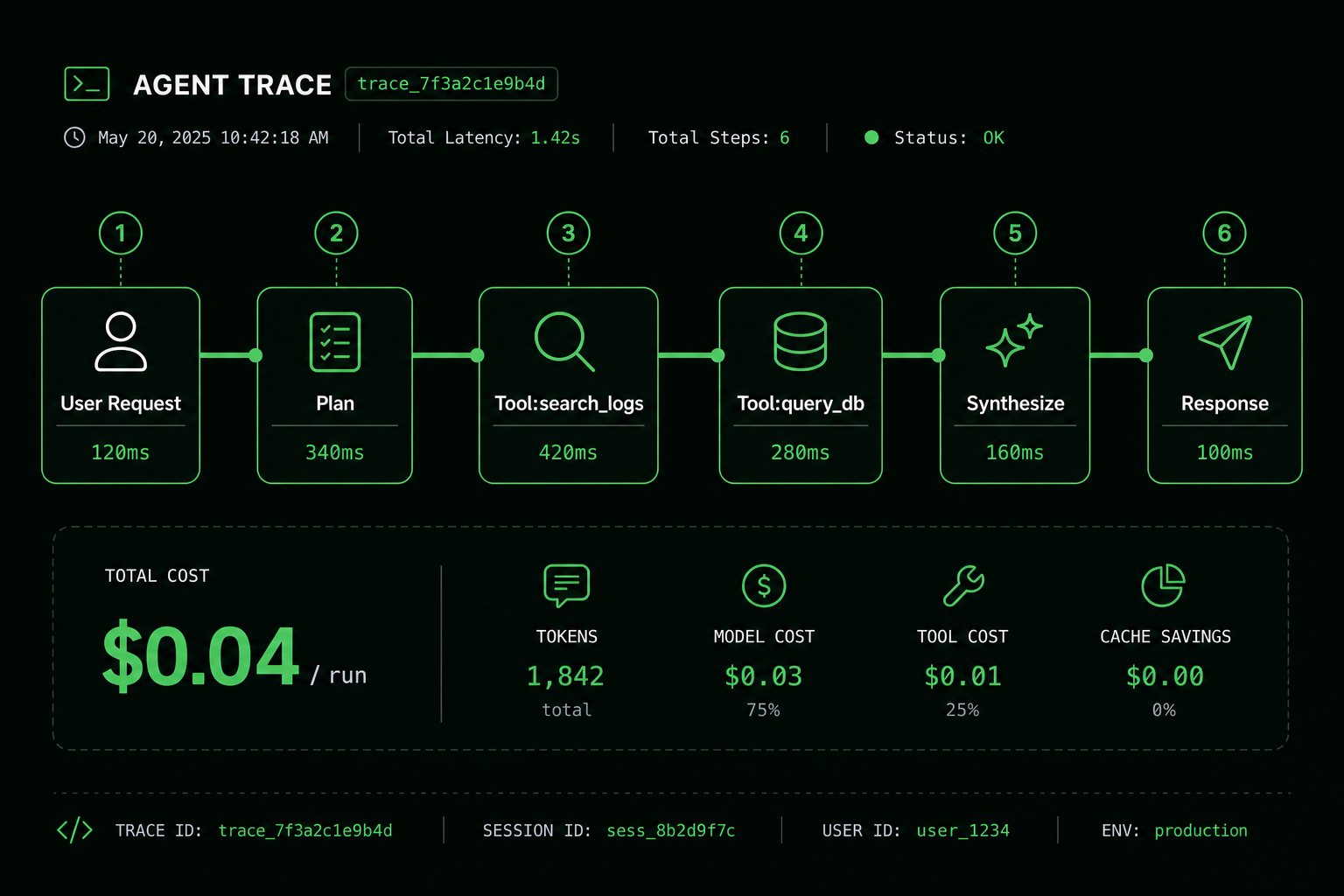
Log structure that has saved us hours:
{
  "runId": "run_8f3a",
  "workflow": "pr_review_assistant",
  "step": 3,
  "tool": "github.get_diff",
  "latencyMs": 340,
  "tokensIn": 4200,
  "tokensOut": 890,
  "costUsd": 0.011,
  "status": "ok"
}
Alert on runaway loops (step count > threshold), cost per run (p95), and tool error rate. If you cannot answer "why did it call that tool?" you cannot pass a security review.
sequenceDiagram
  participant U as User
  participant H as Host
  participant M as Model
  participant T as Tool
  participant L as Trace Log

  U->>H: task
  H->>L: run_start
  loop max 10 steps
    H->>M: messages + tool schemas
    M-->>H: tool_call or final
    H->>L: plan / tool_intent
    alt write tool
      H->>U: approval_required
      U-->>H: approved
    end
    H->>T: execute
    T-->>H: result
    H->>L: tool_result + cost
  end
  H-->>U: answer
Cost and reliability guardrails (numbers to put in config)
These are starting points from teams running agents daily, not universal law:
| Guardrail | Typical value | Why |
|---|---|---|
max_steps | 8–15 | Stops infinite tool spam |
timeout | 60–120s | User-facing workflows need bounds |
max_cost_per_run | $0.10–$0.50 | Finance panic prevention |
context_prune_after | 6–8 tool results | Latency control |
human_approval | all writes | Blast radius |
Fallback to human should be a first-class outcome, not an error message buried in logs. "I could not complete this safely" with a ticket link beats a wrong fix.
Enterprise vs indie: same loop, different governance
Enterprise deployments add identity (SSO), data residency, and procurement-approved model routes. Agents run in VPC-hosted hosts with allowlisted egress. Tool servers live next to internal APIs, not on a laptop.
Indie / startup teams move faster with hosted models and off-the-shelf MCP servers. The same mistakes happen faster too: over-scoped filesystem tools, API keys in prompts, no spend alerts.
| Concern | Enterprise pattern | Indie / small team pattern |
|---|---|---|
| Model access | Private endpoint or approved vendor | Hosted API with project keys |
| Tool hosting | Internal MCP on k8s | Local stdio MCP in IDE |
| Approvals | Ticketing integration + SOX logs | "Ask me in Slack before deploy" |
| Evals | Golden set in CI nightly | Manual replay before launch |
Neither side gets to skip step limits because the model is "smarter this quarter."
Designing MCP tools agents do not misuse
Bad tool descriptions cause bad tool picks. This is the most underrated failure mode in agent projects.
{
  "name": "search_support_tickets",
  "description": "Search closed support tickets by keyword. Read-only. Use when the user asks about past customer issues. Do not use for billing mutations.",
  "inputSchema": {
    "type": "object",
    "properties": {
      "query": { "type": "string", "description": "Keywords from the user question" },
      "limit": { "type": "integer", "maximum": 20, "default": 10 }
    },
    "required": ["query"]
  }
}
Pair every write tool with a confirmation tool or host-level approval UI. create_refund should never be one hop from a vague user message.
Resources (style guides, OpenAPI snippets, runbooks) belong in MCP resources, not stuffed into the system prompt. Refresh resources on deploy so agents cite current API shapes.
Evals: how teams know an agent is ready
Before production, run a small eval suite:
- 10–30 golden tasks from real tickets (redacted)
- Expected tool sequence or allowed tool set per task
- Pass criteria: correct escalation, no forbidden tools, cost under cap
Track regressions when you change models. A planner upgrade that adds 5% accuracy but doubles tool calls is a finance problem.
| Metric | What it tells you |
|---|---|
| Task success rate | Did the user get a usable outcome? |
| Steps per run | Loop health |
| Tool error rate | Integration quality |
| p95 cost per run | Budget fit |
| Human takeover rate | Where the agent is not ready |
Walkthrough: PR review assistant (production-shaped)
A workflow that ships at many companies:
- GitHub webhook fires on
pull_request.opened - Host fetches diff via read-only GitHub MCP tool
- Model summarizes risk areas (auth, migrations, deps)
- Model suggests tests; does not push commits
- Comment posted; human merges
Failure handling matters: if the diff is > 2k lines, refuse and ask for split PRs. If package-lock.json changed, flag supply-chain review. These rules live in orchestrator code, not hope.
Security review before you expose tools
- Allowlist domains for fetch/browser tools
- Deny shell unless sandboxed and audited
- Rotate tokens per MCP server, not one god key
- Log args (redact secrets) for every tool call
- Rate limit per user and per workflow
Treat prompt injection in ticket bodies like XSS: untrusted text can steer the planner. Separate instruction channel from data channel where your host supports it.
Trade-offs we accept (and what we did not choose)
We chose orchestrated graphs for customer data and payment-adjacent workflows. Debugging step 4 of 6 beats replaying a 40-turn chat.
We did not choose fully autonomous loops for anything that sends email or touches production databases. The failure modes are too expensive and too hard to explain to users.
We chose MCP for tool surfaces so we can reuse servers across Cursor, internal hosts, and future models.
We did not choose vendor-specific plugin formats that lock integrations to one IDE.
Open autonomy is fine for read-only research on a laptop. It is a bad default for multi-tenant SaaS without adding policy later anyway.
What breaks if you skip the boring parts
I have watched the same failures recur across teams:
- Unbounded tool lists — the model picks
run_shellbecause it is the hammer. Fix: allowlist per workflow. - No idempotency on writes — webhook retries create duplicate Linear issues. Fix: client-generated keys stored in your DB.
- Context stuffing — pasting entire runbooks blows cost and latency. Fix: retrieve top-k chunks, summarize old tool results after step 6.
- Evaluating on vibes — "seems smarter after the prompt tweak." Fix: golden prompts in CI with expected tool traces.
- Tracing only the final answer — you cannot debug step 4. Fix: structured JSON per step (see observability section).
Agents fail quietly. They do not throw stack traces; they call the wrong tool with confidence. Infrastructure is how you make that visible.
Golden eval harness (stub the model, test the orchestrator)
const goldenCases = [
  {
    task: "Triage PR #42 labeled bug",
    stubTurns: [
      { tool: "github.get_diff", args: { pr: 42 } },
      { tool: "github.search_tests", args: { query: "checkout" } },
      { done: true, answer: "Suggest adding test in checkout.spec.ts" },
    ],
    expectedTools: ["github.get_diff", "github.search_tests"],
  },
];

for (const c of goldenCases) {
  const toolsCalled: string[] = [];
  const stubModel = async () => {
    const next = c.stubTurns[toolsCalled.length];
    if (next.tool) toolsCalled.push(next.tool);
    return next;
  };
  await runAgent(c.task, tools, stubModel);
  assert.deepEqual(toolsCalled, c.expectedTools);
}
Test the orchestrator and policy engine deterministically. Test tools against sandbox APIs. Reserve live model calls for nightly eval jobs where flakiness is acceptable.
Implementation checklist for your first production agent
- Name one workflow — "when PR labeled
bug, summarize diff and suggest test file" - List tools — each side effect gets a tool; prefer MCP servers
- Set caps — max steps, timeout, cost, read-only default
- Add approval — writes need a human or policy engine
- Log every step — run id, tool, latency, tokens, cost
- Golden tests — fixed prompts with expected tool sequences
- Chaos test — tool returns 500; agent should retry once then escalate
2026 landscape: vendors, frameworks, and what to ignore
The market splits into hosts (where the loop runs), frameworks (LangGraph, custom orchestrators, vendor SDKs), and tooling (MCP servers). Models are interchangeable faster than tools.
Ignore benchmarks that only score single-turn trivia. Ask for multi-step tool traces on tasks like yours. If a vendor cannot show step-level logs, they are selling chat with extra steps.
Open-source weights matter for air-gapped deploys. Hosted APIs matter for speed. Most product teams use hosted planners with internal tools, not self-hosted 70B models, unless regulation forces it.
When not to build an agent at all
Sometimes a script + cron wins:
- Deterministic ETL with fixed steps
- Alert routing with known if/else rules
- File transforms with no natural language input
Add an agent when the input is messy language and the tool sequence varies, but still cap the loop. "Agent" is not a moral upgrade over a bash script.
FAQ
What is the difference between an AI agent and a chatbot?
A chatbot usually returns one model response per user message. An agent runs a loop: it may call multiple tools, update memory, and only finish when a stop condition is met. Production agents also carry guardrails (step limits, approvals) that chat wrappers often omit.
Do AI agents replace software engineers in 2026?
No. They replace fragments of toil: boilerplate, first-pass summaries, log search. Ownership of architecture, security, and correctness stays with engineers. See AI replacing developers? for the hiring angle.
Is MCP required to build agents?
No, but it reduces integration tax. Ad-hoc function calling works for one host; MCP helps when you have multiple hosts and want consistent tool schemas. Start with one MCP server for a single workflow before abstracting further.
How do you test agents before production?
Use golden prompts (expected tool sequence), property checks on tool args (SQL must include LIMIT), and chaos on tool failures. Unit test tools themselves; integration test the orchestrator with a stub model that returns fixed tool calls.
Should agents run on local models or cloud APIs?
Read-heavy internal tools can run on local models if latency and privacy matter. Customer-facing agents with tool loops usually stay on cloud APIs for quality and because your laptop cannot host the orchestrator at scale. Hybrid routing (small local classifier, cloud for hard steps) is viable; full local autonomy for write tools is rare outside air-gapped environments.
How many agents should one product have?
Start with one workflow, one agent definition. Add a second only when the first has traces, evals, and an owner. Ten half-built agents is how platform teams lose credibility with security.
Read next
If you are wiring agents into a product, start with one read-heavy workflow and a trace log you can actually query. The landscape in 2026 rewards boring infrastructure, not autonomous theater.
Rohit Singh builds Study Stream Black and writes about shipping software from Jaipur. Related: MCP workflows · LLM coding tools · Prompt vs software engineering